Welcome to the BrightGauge Enhancement Forums
The Enhancement Forums is one of several listening posts used to bring enhancement ideas to the ConnectWise Product Management Team. We utilize information from support tickets, information gathered from our onsite Consulting Team and our Sales Team during the sales process, as well as one-on-one or group discussions with our partners.
Do you have an enhancement you want to suggest or have you come across an enhancement you would like our Product Management Team to review? Vote and leave a comment. The more information gathered on the enhancement, the easier it is to make the case to the Product Management Team. The Product Management team automatically reviews enhancements with 250 votes or more and we will provide any updates to that enhancement as they become available.
Want to know what the statuses mean? Click here or on the "Status Legend" in the Links section.
Show your support for the ideas you like by voting and leaving a comment.
Now get out there and make your voice heard to help BrightGauge grow your company!

 Ability to Customise "Legend" Text
We would like the ability to customise the text in the "Legend" field when this is enabled on Gauges.
An example being that a gauge showing tickets in and not in a Waiting SLA has the text in the Legend stating "True" or "False". I would like to be able to rename this text so it is clearer, I.E. "Waiting" or "Not Waiting".

Hiding a Gauge in a Report if the Gauge is Empty
We would love to see the ability to hide a gauge if the gauge has no data in it. We have a long software report that lists versions of specific software we manage but not all of the applications are found on all sites which creates reports with logs of blank entries. If we could set a gauge in a report to not be shown at all if no data was populated in the query, that would make the report so much more readable for us.
Need a way to report on canceled agreements
The Agreements and Agreement Additions List datasets do not currently report on canceled agreements. I need a way to report on what agreements have been canceled over the last X days so I can report on churn. This is important and seems like it should be a pretty standard feature of the software. Please get this ability added.
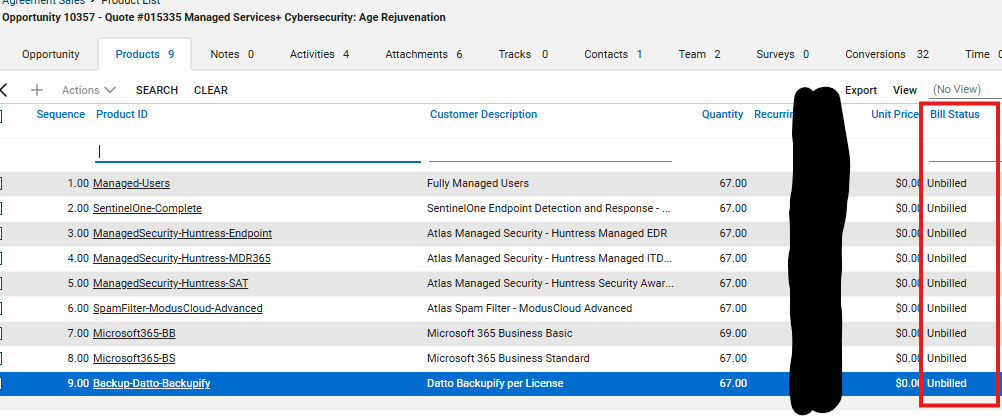
Opportunity - Products tab - Bill Status
The API currently does not show anywhere in the Opportunity or Products APIs if a product on a Won opportunity was billed or not.
I'd like to be able to build a gauge showing any products have not had an agreement set up for them yet. This would help us ensure we're not missing anything on the billing side.
I had asked BG support to add this to a dataset but since it's not in the API, it's not available.
Adding "Source" field to the Opportunities dataset
We use the "Source" field in opportunities to log where a lead came from.
I'd like to have the source field added to the opportunities dataset so that we can use it for filters and dimension on gauges.

Connectwise Ticket Time Entries Dataset Additions
We have a requirement to send clients monthly reports of their tickets along with Summary, Resolution and total Billable time, Total Non-Billable time, Total time along with other details of the ticket. The Ticket Statistics Last 240 Days Dataset has most of this information, would just need to add Resolution and a column showing the type of time entry (B : Billable, NC : No Charge, NB : Do not bill)

Hide Dashboards from Drop-down menu
I would like the ability to hide unused Dashboards from the Drop-down Dashboard list without having to delete them. There are Dashboards created by BrightGauge that we are not currently using, but we don't necessarily want to delete them. We just don't want them in our quick options for viewing. Now that there is the new Dashboard list view feature, this could show "Hidden" dashboards on its own page, or greyed out on the list with an option to "hide" or "unhide" for all users. Admins would be able to review the list of hidden dashboards and "unhide" them if we want to begin to use them.
This would make our drop-down list so much easier to manage!
Create dashboad filters based on viewers
We create various KPI dashboards for our internal team. As the team grows larger having to create filters on multiple dashboards becomes unmanageable. It would be nice to be able to set the CW user ID when creating a viewer and then set one filter on the dashboard like ownerid = current viewer and member = current viewer.
This would allow us to build standard dashboards for KPIs and just grant access to the dashboards.
Allow Reports to go out in Excel
We setup several reports to deliver to our clients throughout the month and the biggest complaint we get back is that the gauges only output to a PDF. We would love to be able to setup an Excel version of the reports so the clients can easily see the data in ways that work better for them.

Dashboard Filters: Exclude Current
There is no option to "Exclude current (day/week/month/year/etc.)" in Dashboard filters like there is in Gauge filters. This would be extremely helpful.
Customer support service by UserEcho