Welcome to the BrightGauge Enhancement Forums
The Enhancement Forums is one of several listening posts used to bring enhancement ideas to the ConnectWise Product Management Team. We utilize information from support tickets, information gathered from our onsite Consulting Team and our Sales Team during the sales process, as well as one-on-one or group discussions with our partners.
Do you have an enhancement you want to suggest or have you come across an enhancement you would like our Product Management Team to review? Vote and leave a comment. The more information gathered on the enhancement, the easier it is to make the case to the Product Management Team. The Product Management team automatically reviews enhancements with 250 votes or more and we will provide any updates to that enhancement as they become available.
Want to know what the statuses mean? Click here or on the "Status Legend" in the Links section.
Show your support for the ideas you like by voting and leaving a comment.
Now get out there and make your voice heard to help BrightGauge grow your company!

 Add Huntress integration to Bright Gauge
We use Huntress for EDR. It has a lot of data that I'd like to get into a dashboard


Create Page Number On Reports Options
1-2 years ago page numbers were added automatically to the bottom of pdf reports. This is rather annoying to clients who have reports with cover pages, and/or table of contents. It's possible clients also combine reports outside of Brightgauge. It looks silly.
Request:
1 - Make page numbers optional yes/no (easy)
2 - Make the page the numbering starts on optional, e.g., start counting on page 2 or three if you have a cover letter and a table of contents (harder)

Bizratings API Update for multi-site reporting
BizRatings API Update needed to include multisite endpoint/ConnectWise Case #02367473 – This datasource is needed to report on CSAT results across multiple locations deployed in BizRatings, current functionality limits BrightGauge reporting to 1 of our locations and isn’t comprehensive

create dashboard default option should be Only selected users
Hello BrightGauge,
I would like to report a design issue with the BrightGauge "Create Dashboard" tool.
When creating a dashboard from the dashboard list view, the default option is set to “Allow access for everyone.”
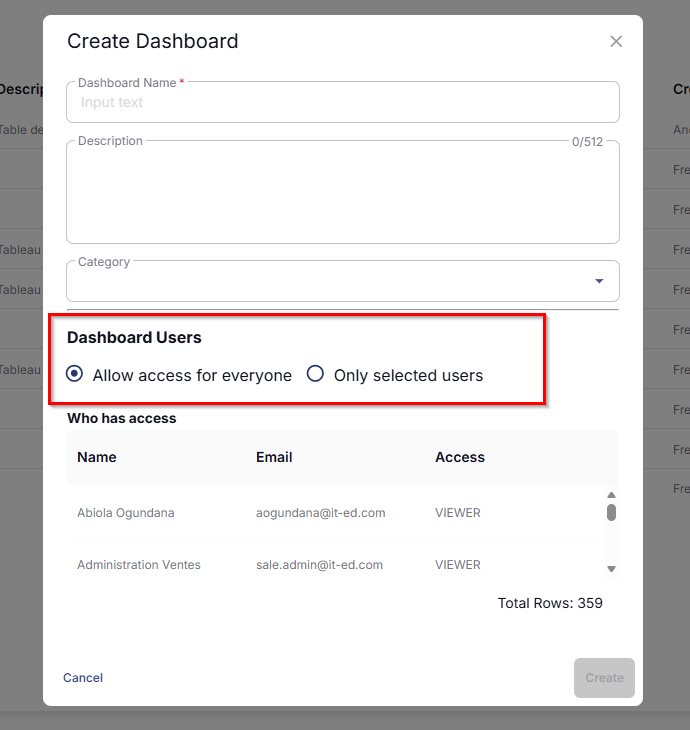
It would be preferable for this option to be set by default to “Only selected users.”
The consequences of forgetting to assign someone are far less significant than assigning everyone by default.
Best regards

Datto M365 Backups
Currently there is no way to report on Datto M365 Backups, including company name, users being backed up, users not being backed up, last success etc. This lives in the same ecosystem as BCDR devices which your Datto rest API pulls from. Its a huge importance for clients to know if their backups are working.

Allow the ability to manually change the color of any gauge/value
It's mildly frustrating to have all gauges/values locked to the global color palette setting. I (and I suspect others) would like the ability to manually change the color of any gauge or value on the fly. I know we can sort of do this with a threshold, but that doesn't recolor the legend and so causes confusion.

Skills and certifcations tab on Member profile
I would like the ability to create a gauge to filter in all members skills & cerifications on their member page from CW PSA. It would be great if this could be added as a field to the Member dataset.
Adding "Is_Active" or excluding "Suspended_Alerts"
A way to add in Brightguage datasets a "Is_Active" for device availability dataset , OR, a way to exclude machines that have been marked as suspended alerts in RMM.
Either way, it removes machines I no longer desire to see in my server down report, but still maintains my ability to connect to the machines should anything weird ever go down with those servers. (hey, it happens).
Snapshot Gauge - Capture Data From Multiple Layers
Add the ability to snapshot/capture data from multiple layers, or to capture more than one number. This way you don't have to create new separate snapshot gauges for each layer and be able to create a multi-line graph showing/comparing like data and trends from those snapshots.
Customer support service by UserEcho