Welcome to the ConnectWise Home
Enhancement Forums
The ConnectWise Home development team uses an agile process.
Every post made here is read by someone on the Product team at ConnectWise. Try to think outside of your immediate needs and format your enhancement requests and feedback as actionable.
Try to answer these questions-
- Why?
- What business outcome would I gain from this feature or change?
- What difficulties or problems are you trying to solve with your team?
The status' are simple and easy to understand. If you see something that Needs Your Feedback, read it and comment! The more voices we have in this forum, the better solution the team can provide.
One of our core values is "We Obsess with Partner Success" and this forum allows us another channel in which to have conversations around your success.

 Billing Email per Site
We've got customers who like to split their billing per site, and additionally have accounts email addresses set up for each billing location, each location is responsible for paying it's own invoices.
We would like to be able to assign a contact to a specific site for billing emails.
Hopefully it's as simple as just getting a button in the site tab of the company that allows you to pick an alternate billing contact and then select from the list that references the Contacts tab from the Company.
Setting them up as separate companies doesn't work, because the Office365 contact sync is only with one company.

Request to add attachments onto tasks
When using ConnectWise, I have found that the 'tasks' feature on a specific service ticket is the best way to create punchlists and/or action items on projects. However, when creating a new task for that specific service ticket, you cannot add any attachments, resulting in not having any pictures/videos to help explain/clarify the task.
What I do currently is take all of my pictures, add them onto a word document, then add the word document onto the 'attachments' of the sevice ticket. Although this is fine, I would love to have the ability to add pictures/videos onto specific tasks.

keep all previous communication in emails when sending updates on support
when we get email updates on open support cases we are often directed to go to login to home, or have to go to login to home to get the full context of the message being received, this would be much better if the email contained all previous communication relating to that support case.

Multiple email addresses under the same contact
Please allow one contact to have multiple email addresses rather than having to be forced to create a separate contact for each email address. Thank you!

ability to group users
it would be nice to be able to assign learning plans and courses to groups of people intead of the idividual. make it so that an admin can group users into a team (ex Sales, service, finance, management) and assign a team leader to assist with monitoring training.

Sync CW Home support tickets with CW Manage
I'm not sure how no one has raised this idea yet. I would like to be able to manage all of my tickets in one place, not have to go to CW Home to manage those and then into Manage for client and NOC tickets. So we need the ability to sync tickets between the CW homepage and CW Manage.

Launch Buttons in the My ConnectWise Hub should be visible and not require hovering.
Just seems silly to not have the Launch buttons visible in the My ConnectWise Hub. The requirement to hover over the Products is an extra step that is not intuitive.

What have you done to Connect University???
Where do I begin... Th enrollment process is ridiculous. Trying to assign a course to a team member under the "Train you Team" is now impossible. For one, there isn't a cohesive list of courses (now called lesson plans) in categories that should have many hours with a break down of the individual lessons anymore.
Reorder MFA options
It would be handy to be able to reorder the MFA options. As an example, we currently use Duo as our primary MFA, and Email as our secondary. It's not a big deal to have to click the dropdown and manually select Duo, then proceed with login, but it would be nice to be able to set it as the primary and skip then annoying step

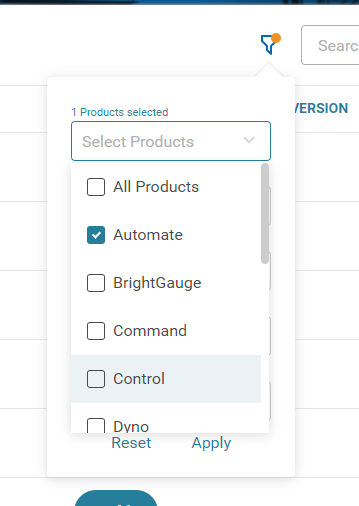
Remember Products and selections on Known Issue Board
We use automate and control, but the known issue board will only check automate each time we navigate to this page. It would be nice if this filter remembered my selections after pressing the apply button.
Customer support service by UserEcho

